PokéWeaver — Free Daily Pokémon Type Puzzle
Daily browser Pokémon grid puzzle: place tiles by shared types, Type or Gen, or 18-type Matchup across Square, Triangle, Hexagon, and Octagon boards.
Free · Daily Pokémon Logic Grid
Loads pokeweaver.com (v1.5.1) directly: Classic, Type or Gen, and 18-type Matchup.
Loading PokéWeaver…
What Is PokéWeaver?
PokéWeaver is a free browser-based daily Pokémon logic puzzle from Stay Tiny Games on pokeweaver.com where strategy players arrange a hand of Pokémon tiles onto Square, Triangle, Hexagon, or Octagon grids so every neighboring pair satisfies Classic type sharing, Type or Gen bridging, or 18-type Matchup arrows with no downloads.
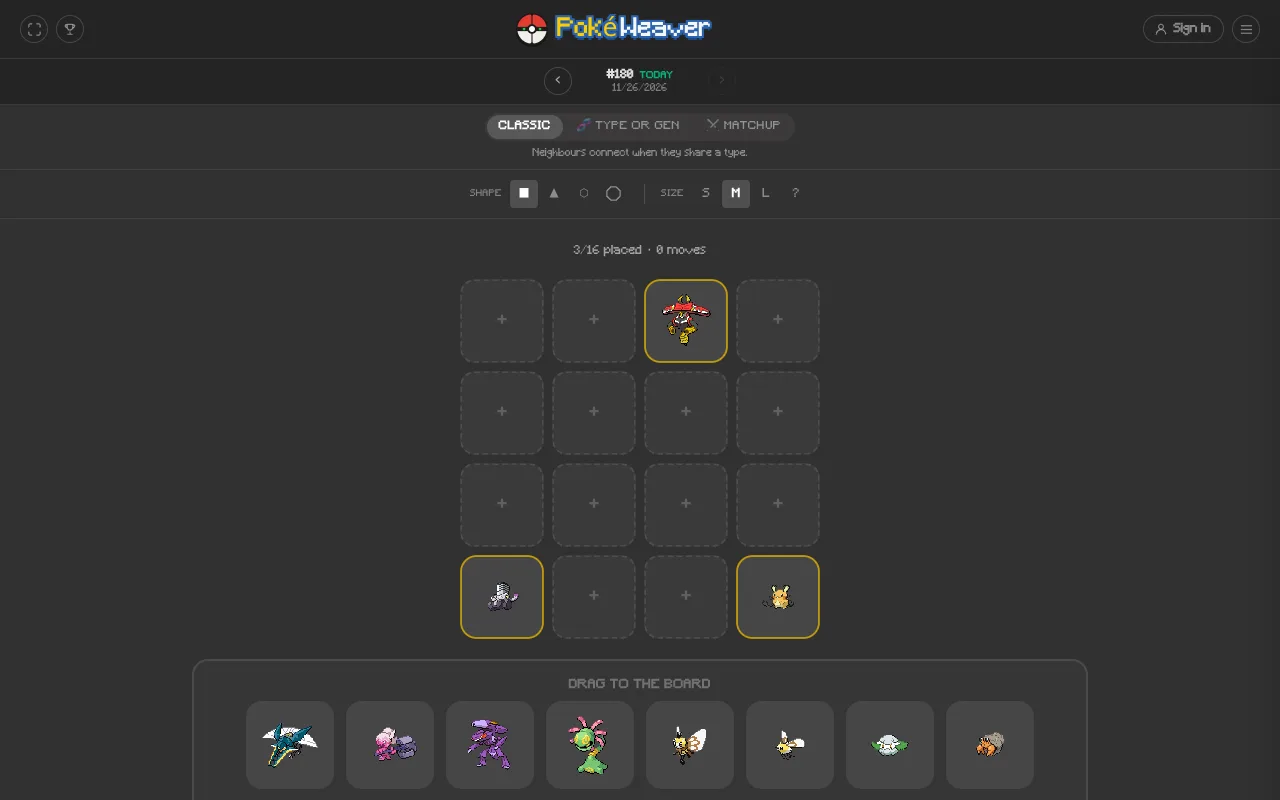
Fixed gold-bordered anchor tiles lock the corners or edges of each daily board while your remaining hand waits in the Drag to the Board tray. Because a dual-type Pokémon bridges two different mono-type lines at once, finding those hub pieces unlocks the grid in minimal moves.
In v1.5.1, the built-in Settings panel lets you toggle type badges off, show species names, pick among 10 interface languages, or swap tile rosters across Generations 1 through 9 without changing the underlying puzzle solution logic.
PokéWeaver vs Daily Red, Tuffymon, Pokelike2 & Inazuma Rogue
All five browser fan games below were checked live on 24–26 Nov 2026 so you can compare daily logic grids, Gen 3 boss battles, 110-trainer drafts, and 5v5 football.
| Game / Source | Core format | Modes & replay | Controls & access | Checked |
|---|---|---|---|---|
| PokéWeaver (pokeweaver.com, playable here) | Daily grid puzzle connecting Pokémon by type, generation, or 18-type matchup multipliers | Classic, Type or Gen, Matchup (Square, Triangle, Hexagon, Octagon · S/M/L/?) | Mouse / touch drag-and-drop | 26 Nov 2026 |
| Daily Red (daily-red.com) | Shared 6-Pokémon team vs Red's Lv.100 Mt. Silver squad (Gen 3 Showdown) | 1 official daily battle + unlimited Practice runs | Mouse / touch | 24 Nov 2026 |
| Tuffymon (tuffymon.org) | 6-Pokémon random generation & type draft vs 110-trainer gauntlet | Daily Challenge, Free Run, Category Challenge, Vs CPU | Mouse / touch (+ keyboard in Tuffest) | 24 Nov 2026 |
| Pokelike2 (pokelike2.com) | 5-region branching-map Pokémon roguelike and Daily Pokésort | Classic & Nuzlocke Story, Battle Tower, Daily Pokésort | Mouse / touch + keyboard shortcuts | 26 Nov 2026 |
| Inazuma Rogue (main game on this site) | 5v5 real-time football roguelite with gacha and pity rule | Career, Story, Chains, Draft, Ranked, Private room, Clans | Mouse / touch | 26 Nov 2026 |
How to play PokéWeaver
-
Check the pre-placed gold-bordered anchor tiles
Every PokéWeaver daily seed (such as #180) opens with fixed anchor Pokémon on the grid, leaving open slots marked with plus signs that dictate which types must bridge the gaps.
-
Select Classic, Type or Gen, or Matchup rules
Switch rule tabs across the top bar: Classic requires neighboring tiles to share a type, Type or Gen allows either type or region generation matches, and Matchup replaces monsters with all 18 elemental types linked by damage-multiplier arrows.
-
Pick your board Shape and Size (S, M, L, ?)
Use the Shape and Size toolbar to play Square, Triangle, Hexagon, or Octagon grids across Small (3x3), Medium (4x4), Large, or Random (with holes) layouts while tracking placed tiles and moves.
-
Tune difficulty with Types hidden and Generation filters
Open Settings if you want hidden type badges or printed Pokémon names, or restrict active species to selected Generations (1 to 9). Missing types fall back to the original Pokémon when an older generation such as Gen 1 lacks Steel, Dark, or Fairy.
-
Place all remaining hand tiles with fewer moves
Drag every Pokémon from the Drag to the Board tray into empty or swappable cells until all neighboring pairs obey the active rule, then use arrow controls beside the puzzle number to replay past dates.
Drag or tap tiles from the bottom hand into open board slots. Use Settings in the header to toggle Types hidden, Names, specific Pokémon Generations (1–9), or switch among 10 interface languages.
Rule modes, board shapes, and difficulty filters in PokéWeaver v1.5.1
All rule tabs, board shapes, and Settings behaviors below were verified live on pokeweaver.com on 26 Nov 2026.
-
Classic (Type Connection)
Default daily puzzle where any two adjacent tiles must share at least one Pokémon type, rewarding dual-type connectors across corner intersections.
-
Type or Gen
Expanded bridging rule where neighboring tiles connect when they share either an elemental type or the same home generation.
-
Matchup (18-Type Multiplier Mode)
Replaces Pokémon tiles with all 18 elemental types that must follow directional damage-multiplier arrows across the board.
-
Multi-Shape & Generation Filters (v1.5.1)
Switch daily layouts between Square (3x3 and 4x4), Triangle, Hexagon, and Octagon boards across Small, Medium, Large, and Random (with holes) settings, or browse past daily dates.
Practical tips for PokéWeaver
- Identify dual-type tiles in your tray first (for instance Bug/Electric or Poison/Fairy), since they sit cleanly at junctions linking two otherwise incompatible rows.
- Place tiles around locked gold-bordered anchors before guessing central slots, because anchors narrow eligible types for up to three surrounding cells at once.
- If you switch Generation filters down to Gen 1, check whether Steel, Dark, or Fairy tiles remain untouched; PokéWeaver preserves original species whenever a selected generation has no match.
- Try Hexagon grids or Types hidden mode once Square Small gets comfortable; it turns visual familiarity into genuine type-chart recall.
PokéWeaver FAQ
- When does PokéWeaver reset and can I play older daily puzzles?
- PokéWeaver resets daily at 00:00 UTC with the same board for everyone, and you can use the left and right arrows beside the puzzle number (such as #180) to play earlier dates across Classic, Type or Gen, and Matchup.
- How does Matchup mode differ from Classic mode?
- In Matchup mode, individual Pokémon tiles are replaced by the 18 elemental types, and connections require matching exact offensive or defensive type-chart multiplier arrows between adjacent slots.
- What changes when I filter Generations in PokéWeaver Settings?
- Selecting specific Generations (1 through 9) in Settings keeps the underlying daily puzzle structure identical for all players while swapping tiles for same-type Pokémon from your chosen generations. Because older generations lack later types, such as Gen 1 having no Steel, Dark, or Fairy, PokéWeaver retains the original Pokémon when no same-type match exists.
- Can I hide type badges or display Pokémon names in PokéWeaver?
- Yes. Click Settings in the header and toggle Types hidden to test raw type memory without badges, or toggle Names if you want printed species labels underneath each sprite.
- Do I need an account or download to play PokéWeaver?
- No download or account is required to solve boards. Drag and drop tiles directly on desktop mice or mobile touchscreens across 10 built-in UI languages, with Sign in strictly optional.
Notice: PokéWeaver is an unofficial, free fan-made daily puzzle developed by Stay Tiny Games at pokeweaver.com and is not affiliated with Nintendo, Creatures Inc., or GAME FREAK. InazumaRogue.net is an independent portal embedding the live web build.
More Fan-Made Browser Games
Inazuma Rogue (Main Game)
Play the main 5v5 real-time football roguelite with gacha pulls, Chains, Draft, and live Ranked matches.
PokéDefense
Defend paths across 32 Classic maps, 8 Story chapters, Co-op rooms, and Endless Augmented runs in PokéDefense.
Daily Red Pokémon
Challenge Trainer Red's Lv.100 Mt. Silver squad with today's shared six Gen 1–3 Pokémon on Showdown rules.
Tuffymon
Draft six Pokémon by random generation and type and battle a 110-trainer gauntlet across 4 modes.
Player comments
Share a build, matchup tip, or high-score run with other players.