Pokemon Redstone: Free 2D Pixel Kanto Browser Game
Play Pokemon Redstone free in your browser: Minecraft survival crafting meets pixel-art Kanto towns with 9-slot hotbar, minimap, keyboard keys, and mobile buttons.
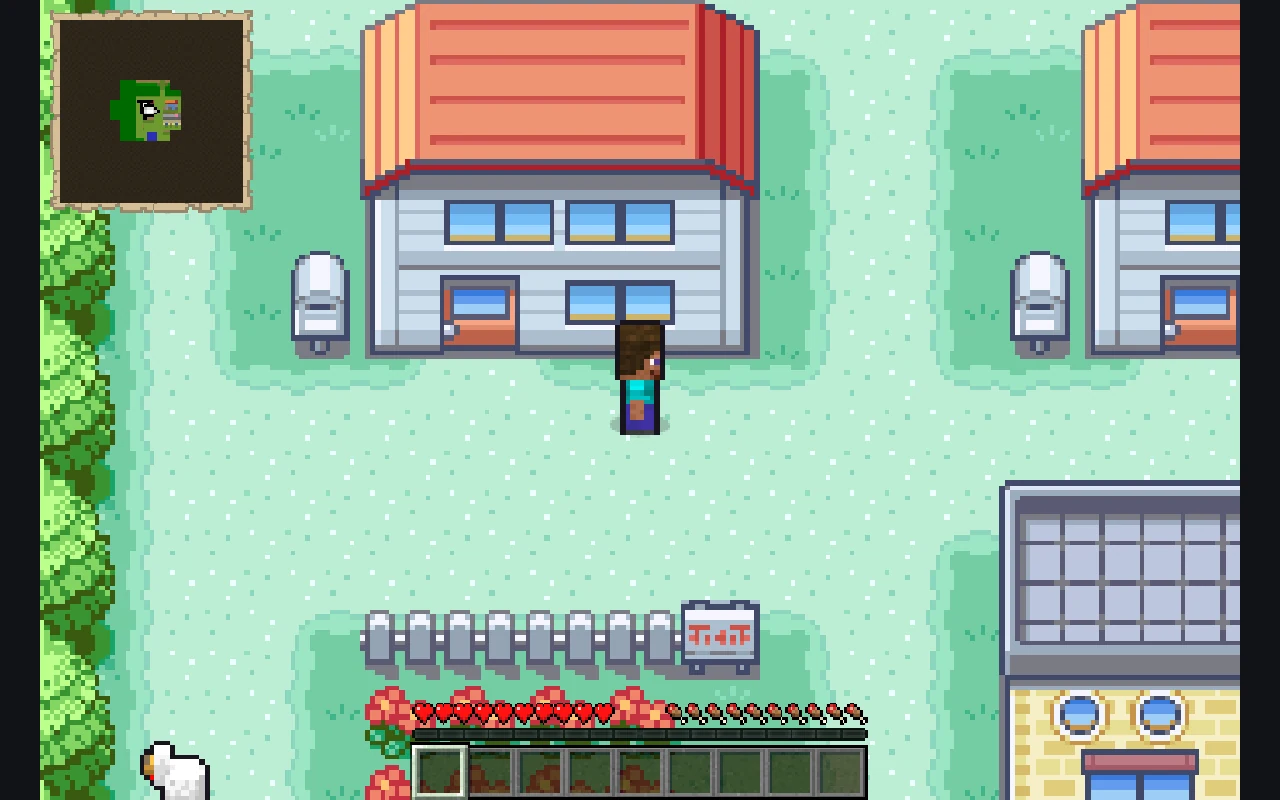
Free · Kanto x Minecraft Sandbox Crossover
Loads pokemon-redstone.pages.dev directly in this tab. Keyboard + touch controls ready, no download.
Loading Pokemon Redstone…
What Is Pokemon Redstone?
Pokemon Redstone is an unofficial free browser fan game by @mozetech hosted on pokemon-redstone.pages.dev that merges Minecraft survival mining, crafting, and block placement with pixel-art Kanto towns inspired by Pokemon FireRed. Explore directly in your browser with WASD or built-in touch controls, a top-left minimap, hearts, hunger, and a 9-slot hotbar.
Unlike traditional turn-based Pokemon web ports, the crossover drops Minecraft's Steve into a retro 480x320 Kanto town complete with red-roofed houses, mailboxes, professor lab facades, fences, flowers, and blocky chickens. Pressing Z mines terrain, talks to townsfolk, or initiates combat while X places blocks or consumes food.
The live HTML5 build loads immediately with no emulator setup or ROM file needed, giving desktop keyboard players and touch devices responsive controls inside this tab.
Pokemon Redstone vs Pokelike2, Dungeons and Pokemons, PokeBrawl & Inazuma Rogue
All five browser fan games below were checked live on 26 Nov 2026 so you can compare sandbox Kanto exploration against branching roguelikes, platform fighting, and 5v5 football.
| Game / Source | Core format | Modes & replay | Controls & access | Checked |
|---|---|---|---|---|
| Pokemon Redstone (pokemon-redstone.pages.dev, playable here) | 2D pixel Minecraft survival x Kanto FireRed map crossover | Solo Kanto Overworld Sandbox, Join Co-op option, Inventory/Crafting, Map view | Arrows/WASD move, Z mine/attack/talk, X use/eat, Space jump, E inventory, touch buttons | 26 Nov 2026 |
| Pokelike2 (pokelike2.com) | 5-region branching-map Pokemon roguelike and Daily Pokesort | Classic & Nuzlocke Story, Battle Tower, Daily/Weekly/Endless Challenges, Daily Pokesort | Mouse / touch + keyboard shortcuts (Space, R, S, number keys) | 26 Nov 2026 |
| Dungeons and Pokemons (dungeons-and-pokemons.com) | PokeAPI route-runner roguelike with 43 relics and 14 stop types | Standard Route Run, Battle Frontier (beta), Randomizer, Custom mode | Mouse / touch | 26 Nov 2026 |
| PokeBrawl (poke-brawl.github.io) | Real-time 2D pixel Pokemon platform fighter (v0.99.36) | Arcade, Expedition, VS CPU, Training hitboxes, 8-player Online rooms | Remappable keyboard + mobile pad | 26 Nov 2026 |
| Inazuma Rogue (main game on this site) | 5v5 real-time football roguelite with gacha pulls and pity rule | Career, Story, Chains, Draft, Ranked, Private room, Clans | Mouse / touch | First-party |
How to play Pokemon Redstone
-
Launch the game and pass the Redstone Version title screen
Click Play above and tap inside the game canvas so your keyboard focuses. Press Z or Enter past the dark-red Redstone Version screen to open the FireRed menu (Continue, New Game, or Worlds), then press Z or Enter to drop into the pixel-art Kanto town as Steve.
-
Explore Pallet Town terrain using the top-left minimap
Walk past red-roofed houses, mailboxes, fences, flower patches, and trees with Arrows or WASD, using the parchment-framed minimap in the top left or pressing J to view surroundings.
-
Mine blocks, fight, and swap tools in the 9-slot hotbar
Hold Z to mine resources, interact with signs or NPCs, and battle; press X to eat food or place blocks; and switch between the 9 bottom hotbar slots with keys 1 to 9, scroll wheel, C, or V.
-
Open Inventory, sneak, jump, or pause cleanly
Press E to open inventory crafting, hold Shift to sprint or Tab to sneak, press Space to jump, or press Enter for the in-game pause menu. JOIN CO-OP and CONTROLS also sit directly on the opening Redstone Version title screen.
Use Arrows or WASD to move, Z (hold or tap) to mine, attack, or talk, X to use, place, or eat items, Space to jump, Shift to sprint, Tab to sneak, E for inventory, Q to drop, 1 to 9 or C/V for the 9-slot hotbar, Enter for menu, J for map, and M to toggle music. On touch devices (pointer: coarse displays), the game switches to an on-screen D-pad plus INV, SNEAK, MENU, JUMP, B, and A touch buttons.
Gameplay mechanics and controls in Pokemon Redstone
Every keyboard shortcut, HUD meter, and touch control listed below was verified live inside pokemon-redstone.pages.dev on 26 Nov 2026.
-
Kanto Overworld Survival Sandbox
Explore Kanto landmarks, harvest world blocks, manage 10 heart health and 10 hunger points, craft gear via E inventory, and track explored tiles on the corner minimap.
-
Minecraft Mining, Crafting & 9-Slot Hotbar
Hold Z to break and gather tiles, drop items with Q, place structures with X, and organize tools across 9 quick-access hotbar slots using 1-9, C, V, or touch controls.
-
Desktop Keyboard & Mobile Touch Input
On touch displays (pointer: coarse), full directional buttons paired with INV, SNEAK, MENU, JUMP, B, and A touch keys replace the desktop keyboard legend.
-
Title Screen Controls & Co-op Entry
The opening Pokemon Redstone Version title canvas includes JOIN CO-OP and CONTROLS menu entries alongside direct solo world start.
Practical tips for Pokemon Redstone
- Click once directly inside the canvas after loading so keyboard commands (Z, X, Space, E, and WASD/Arrows) register without scrolling the page.
- Watch the bottom 10-heart health bar and 10-chicken hunger bar while mining away from starting buildings so you remember to eat supplies with X.
- Use keys J and Enter whenever you want to glance at the larger Kanto map layout or open the pause menu without losing your spot.
- Keep tools ordered in hotbar slots 1 through 9 and use C/V or mouse scroll to swap rapidly when switching between harvesting blocks and battles.
Pokemon Redstone FAQ
- Do I need to download a ROM or Minecraft mod to play Pokemon Redstone?
- No. No download, ROM, or emulator is required. Click Play above to run the 480x320 HTML5 build from pokemon-redstone.pages.dev directly inside desktop and mobile browsers.
- What are the controls for Pokemon Redstone in a browser?
- Move with WASD or Arrow keys, hold Z to mine/attack/talk, press X to place/use/eat, press Space to jump, E for inventory, 1 to 9 for hotbar slots, J for map, Enter for menu, and M to mute music. On touchscreens, tap the on-screen D-pad and action buttons.
- Does Pokemon Redstone work on mobile touchscreens?
- Yes. On touch devices (pointer: coarse displays), pokemon-redstone.pages.dev swaps the desktop keyboard legend for an on-screen D-pad plus INV, SNEAK, MENU, JUMP, B, and A touch buttons.
- Why do my Arrow keys or Spacebar not move Steve right away?
- Click Fullscreen in the toolbar above and click once inside the game canvas so your browser routes Arrow keys and Space cleanly into the game instead of scrolling the outer page.
- Is Pokemon Redstone an official Nintendo or Mojang release?
- No. Pokemon Redstone is an unofficial, free fan crossover created by @mozetech, and InazumaRogue.net is an independent portal with no affiliation to @mozetech, Nintendo, Game Freak, Creatures, The Pokemon Company, Mojang, or Microsoft.
Notice: Pokemon Redstone is an unofficial, free fan crossover built by @mozetech and hosted on pokemon-redstone.pages.dev. It is not affiliated with or endorsed by Nintendo, Game Freak, Creatures, The Pokemon Company, Mojang, or Microsoft. InazumaRogue.net is an independent portal embedding the live web build.
More Fan-Made Browser Games
Pokelike2
Explore Kanto through Unova on branching roguelike maps with Classic & Nuzlocke runs, Battle Tower, Challenges, and Daily Pokesort.
Dungeons and Pokemons
Spin a 29-starter wheel, stack 43 relics across 14 route stop types, and climb Battle Frontier in your browser.
PokeVoid
Explore Path of the Saviour and Reaper Chaos roguelite runs with Nuzlocke rules, fusions, and Glitch evolutions.
Inazuma Rogue (Main Game)
Play the core 5v5 real-time football roguelite with gacha pulls, Chains, Draft, and live 1v1 Ranked matches.
Player comments
Share a build, matchup tip, or high-score run with other players.